A Better Clipboard Manager for Mac
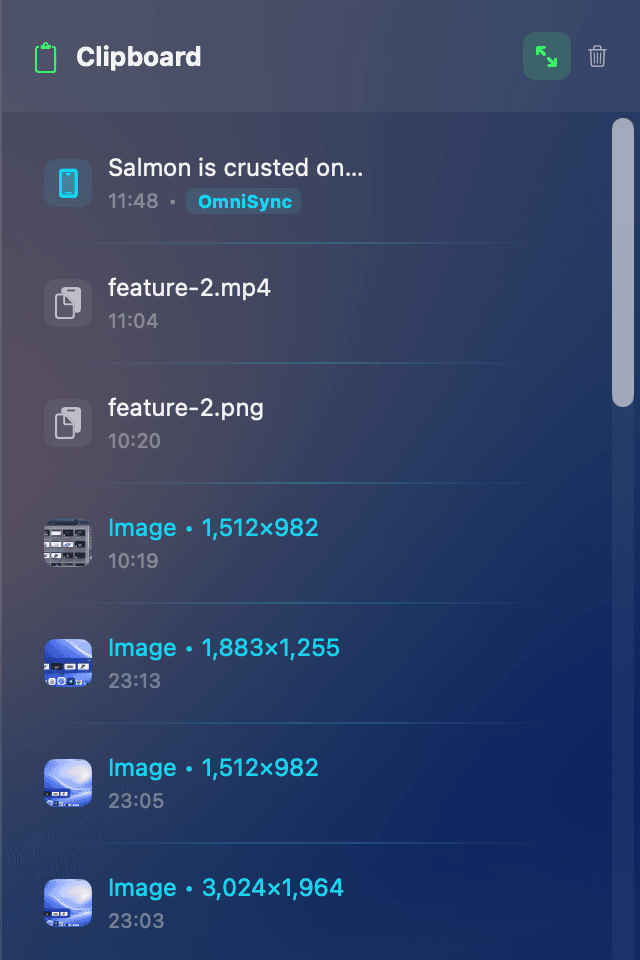
Copy once, paste anywhere — even minutes later. DockMaster includes a clipboard history panel that keeps your recent copies accessible. Text, images, links, and file references are all captured and ready when you need them.
How It Works
DockMaster monitors your clipboard locally and stores recent items in a searchable panel accessible from the Dock. Press a shortcut or hover to open your clipboard history, then click any item to paste it.
- Text, images, and links — all copy types are captured automatically.
- Searchable history — find past copies without scrolling through a long list.
- Quick paste — click any item to paste it into the current app.
- Privacy-first — clipboard processing happens entirely on your Mac. Nothing is uploaded.
Free vs Pro
The free version includes clipboard history with a limited number of items. When you approach the limit, a gentle reminder appears. Pro (£14.99) removes the limit and unlocks the full experience — including unlimited clipboard history and the File Shelf.
Why Not a Standalone Clipboard Manager?
Most clipboard managers are separate apps with their own windows and shortcuts. DockMaster integrates clipboard history directly into the Dock, alongside window previews and the File Shelf. One tool, one workflow — no extra apps cluttering your menu bar.
Privacy
Your clipboard data stays on your Mac. DockMaster does not upload, sync, or share clipboard content with any server for these features. Processing is entirely local.